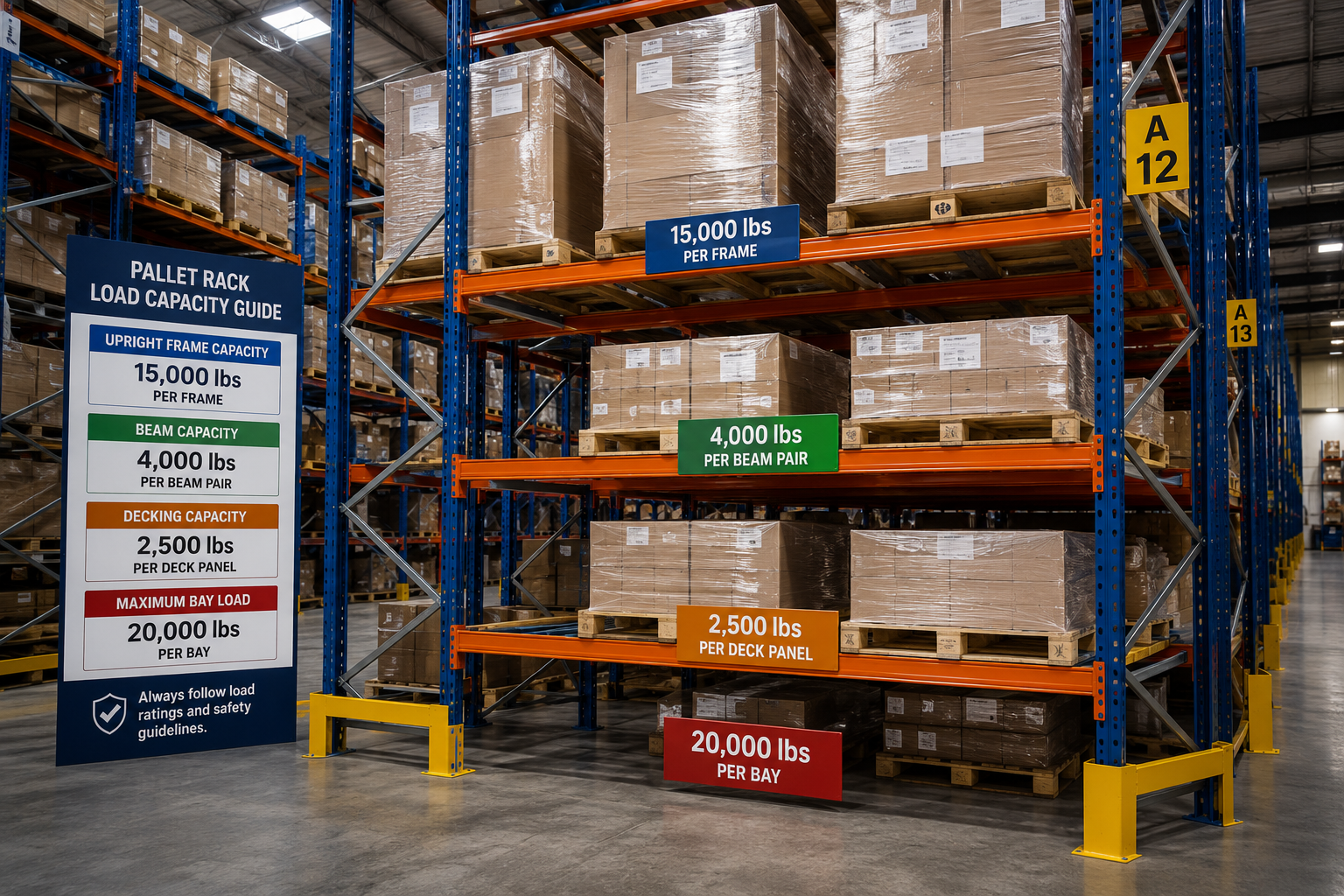
Load Capacity Guide
How Much Weight Can a
Pallet Rack Hold?
✦ Direct Answer — Featured Snippet
A standard selective pallet rack bay can hold between 8,000 and 30,000 lbs total — but the actual number depends entirely on your upright height, column gauge, beam depth, and installed configuration. Always verify against your manufacturer's load data and posted load placard.
Bay Capacity is the total max load across all levels combined — typically 8,000–30,000 lbs
Beam Capacity is the max load per level pair — typically 2,500–8,000 lbs per beam pair
Both limits apply independently — staying within one while exceeding the other is still unsafe
Most warehouse operators ask the wrong question. Instead of "how much can a pallet rack hold?" the right question is: "what is the rated capacity of my specific upright and beam combination, in my installed configuration?" The answer is always in your manufacturer's load data — not on a generic chart.
This guide explains exactly how pallet rack load capacity works, what the numbers on your load placard mean, how to calculate your real-world requirements, and what OSHA and ANSI require you to do with that information.
Bay Capacity vs Beam Capacity — Two Different Numbers That Both Apply
The most critical concept in pallet rack load capacity is the difference between bay capacity and beam capacity. Confusing them is one of the most common — and dangerous — mistakes in warehouse operations.
Bay / Frame Capacity
Total System
8,000–30,000 lbs
typical range — all beam levels combined
Bay capacity is the maximum total load the entire upright frame can support across all beam levels combined. This is the number on your load capacity placard. A typical mid-size upright might be rated 20,000–30,000 lbs total.
Key rule: Taller uprights of the same column gauge carry lower bay capacity because greater height increases susceptibility to column buckling under load.
Beam Pair Capacity
Per Level
2,500–8,000 lbs
typical range — per beam pair, per level
Beam capacity is the maximum load a single pair of beams supports at one level — rated on a Uniform Distributed Load (UDL) basis. A typical 8-foot beam pair might be rated 4,000–5,000 lbs UDL.
Key rule: The sum of all beam-level loads must never exceed the bay (frame) capacity. Both limits apply independently.
| Capacity Type | What It Measures | Where to Find It |
|---|
| Bay / Frame Capacity | Total load entire frame supports — all levels combined | Load capacity placard posted at aisle end |
| Beam Pair Capacity | Load one pair of beams supports at one level — UDL basis | Beam manufacturer spec sheet or beam label |
| Column Capacity | Upright's resistance to vertical compressive load | Upright manufacturer engineering data |
7 Factors That Determine Your Rack's Load Capacity
Load capacity is not a single fixed number — it's the result of multiple interacting design variables. Understanding each one helps you correctly specify, evaluate, and operate your racking system.
Taller uprights carry lower bay capacity for the same column gauge. A 10-ft upright supports significantly more total load than a 20-ft upright of identical steel gauge — height increases column slenderness and buckling risk.
↓ Taller = Lower Capacity
Heavier gauge (thicker) steel means higher capacity. Column gauge is specified in manufacturer engineering data and cannot be determined visually — always request spec sheets when evaluating used rack.
↑ Heavier Gauge = Higher Capacity
Deeper beams resist more bending force. A 6-inch-deep beam supports significantly more than a 4-inch beam at the same length and gauge. Never substitute a shallower beam to reduce cost.
↑ Deeper Beam = Higher Capacity
04
Beam Length (Bay Width)
Longer beams must support load over a greater span, reducing capacity per pair. A 120-inch beam carries less than a 96-inch beam of the same gauge and depth — wider bays mean lower beam capacity.
↓ Longer Span = Lower Capacity
Load must be distributed across all levels. Concentrating heavy pallets on the bottom levels while upper levels are empty changes the load distribution the frame was engineered for — potentially exceeding upright design limits.
Uneven Load = Structural Risk
Pallets extending beyond beam ends transfer point loads to uprights — dramatically reducing effective capacity and creating localized column stress not accounted for in standard ratings.
Overhang = Point Load Risk
Warehouses in California and other seismic zones require reduced working load limits to maintain safety margins against lateral earthquake forces. ANSI MH16.1 and local building codes provide zone-specific requirements.
Seismic Zone = Reduced Working Loads
Pallet Rack Load Capacity Reference Chart
The table below provides general load capacity ranges for common selective pallet rack configurations. All values are approximate reference ranges — always use your specific manufacturer's engineering data for actual rated capacities.
| Upright Height | Column Profile | Beam Depth | Bay Capacity (Est.) | Beam Capacity (Est.) |
|---|
| 8 ft | 3"×1.5" standard | 4 inch | | 4,000–5,500 lbs/pair |
| 12 ft | 3"×1.5" standard | 4–5 inch | | 4,000–6,000 lbs/pair |
| 16 ft | 3"×1.5" standard | 5–6 inch | | 3,500–5,500 lbs/pair |
| 20 ft | 4"×3" heavy | 6–8 inch | | 4,000–6,500 lbs/pair |
| 24 ft | 4"×3" heavy | 8–10 inch | | 4,500–8,000 lbs/pair |
Important: These are illustrative reference ranges only — not specifications. Actual capacity depends on your specific upright and beam model and the manufacturer's engineering load tables. Always verify with your manufacturer or racking supplier before loading the system.
How to Calculate Your Pallet Rack Load Requirements — 5 Steps
Before comparing your rack's rated capacity to your actual loads, you need to calculate your real-world load requirements. Follow these five steps to determine your required beam pair capacity and bay capacity.
1
Determine Your Heaviest Pallet Weight
Weigh the heaviest loaded pallet that will be stored in the system. If you have multiple product types, document the weight of each. Add a 10–15% safety buffer to account for weight variability and dynamic loading from forklift placement.
2
Determine Pallets Per Beam Level
Count how many pallets sit on each pair of beams. Standard 40"×48" pallets in a standard 8-foot bay hold 2 pallets per level. Double-deep configurations hold 4 pallets. Ensure no pallet will overhang beam ends.
3
Calculate Required Beam Pair Capacity
Multiply pallets per level by the buffered maximum pallet weight to get the required beam pair capacity for each level.
4
Calculate Required Bay Capacity
Multiply the required beam pair capacity by the number of beam levels to get the total required bay capacity for the upright frame.
5
Compare to Rated Capacity — Both Numbers Must Pass
Compare your calculated requirements to the rated beam pair capacity and bay capacity on your manufacturer's spec sheet. Both numbers must independently meet or exceed your requirements — beam capacity AND bay capacity.
🛡️Safety Rule: Never load a pallet rack system to more than 85% of its rated capacity. The 15% buffer accounts for dynamic loads, weight variability, and gradual structural wear over the system's lifespan.
OSHA and ANSI Load Capacity Requirements
Load capacity is not just an engineering question — it's a compliance requirement. OSHA and ANSI MH16.1 have specific mandates that apply to every pallet rack system in a commercial warehouse.
📋OSHA General Duty Clause — Load Placards
OSHA 29 CFR / General Duty Clause
Every pallet rack system must have a visible load capacity placard posted at the end of each aisle or bay showing maximum permitted load per bay and per beam level. Placards must reflect the actual installed configuration — not theoretical design maximum.
📐ANSI MH16.1 — Design & Engineering Standard
American National Standard — Industrial Steel Storage Racks
Governs the engineering design of all industrial pallet racking. Requires systems to be designed for actual maximum anticipated loads with a safety factor of 1.67x and includes zone-specific seismic provisions that reduce allowable working loads.
✓
All rack systems must be designed for the actual maximum anticipated loads — not theoretical minimums
✓
Upright frame design must include a safety factor — typically 1.67x for standard loading conditions
✓
Beam design must account for Uniform Distributed Load (UDL) at maximum rated capacity per level
✓
Seismic zone requirements reduce allowable working loads — verify local zone classification before finalizing specs
✓
Rack systems must be anchored to concrete with sufficient embedment to resist calculated base shear and overturning moment
Compliance Reminder: Every time you reconfigure beam heights, change product weights, or modify the rack system, the load capacity placard must be updated to reflect the new configuration before the system is reloaded. Using outdated placards is an OSHA violation.
Warning Signs Your Pallet Rack May Be Overloaded
Overloading rarely announces itself with a sudden failure. It accumulates gradually — and there are visible warning signs. Train your team to identify and immediately report any of the following:
| Warning Sign | Risk Level | Immediate Action Required |
|---|
| Visible beam deflection (sagging) | Critical | Take bay out of service — unload immediately and contact your racking supplier |
| Bowed or leaning uprights | Critical | Clear adjacent bays — do not reload until inspected by a qualified professional |
| Beams shifted from original position | High | Verify safety pins, check for impact — inspect before reloading |
| Unusual creaking or popping sounds | High | Stop operations — identify source; may indicate metal fatigue under overload stress |
| Pallets extending beyond beam ends | High | Rearrange pallet placement immediately — overhang creates dangerous point loads on uprights |
| Load placard missing or illegible | Compliance | Replace immediately — OSHA compliance requirement and essential operational safety tool |
How to Increase Load Capacity Without Replacing the System
If your current system is approaching its rated capacity or you need to store heavier product, there are several options short of complete system replacement — each with different cost and complexity implications.
⬆️
Upgrade to Deeper Beams
Replacing current beams with deeper-profile beams of the same length significantly increases beam pair capacity. Must use same-manufacturer beams to maintain the system's rated capacity.
High Impact
➕
Add a Beam Level
If unused vertical space exists, adding a beam level distributes total load across more levels — reducing per-level load. Frame capacity must support the additional level and total weight.
Medium Impact
↔️
Reduce Bay Width
Switching from 8-foot to 7-foot bays (shorter beam spans) increases beam pair capacity for the same beam depth. Requires new beams but not necessarily new uprights.
Medium Impact
🏛️
Replace Uprights with Higher-Capacity Frames
Upgrading to heavier column gauge uprights increases bay capacity significantly. More involved than beam changes but less costly than complete system replacement.
High Impact
⬛
Add Wire Decking or Pallet Supports
Wire decking distributes pallet load more evenly across beam pairs, reducing point loading and effectively increasing the safe working load for many pallet types and product configurations.
Low Cost
Before Making Changes: Any modification to your racking system — including beam replacement, adding levels, or changing column gauge — must be supported by updated engineering documentation and a revised load capacity placard before the system is reloaded. Do not assume capacity — verify it.
5 Critical Load Capacity Mistakes to Avoid
These mistakes are repeated across warehouses of all sizes. Understanding them is the most effective way to avoid costly rack failure or OSHA non-compliance.
1
❌ Confusing beam capacity with bay capacity
Meeting the beam pair capacity requirement is not enough — the sum of all level loads must also stay within the bay (frame) capacity. Both numbers apply independently and must each be verified.
2
❌ Using generic charts instead of manufacturer data
Generic capacity charts are illustrative ranges, not rated specifications. Your actual working load limit is always in your specific manufacturer's engineering load tables — request them if you don't have them.
3
❌ Not accounting for dynamic loads
Static load ratings assume loads are placed carefully and remain stationary. Forklift impact, vibration, and sudden product shifts create dynamic loads that can exceed static ratings. Always maintain the 15% safety buffer.
4
❌ Mixing component brands without verification
Substituting beams from a different manufacturer into existing uprights voids all load ratings. Even identical-looking teardrop connections are not cross-rated between manufacturers without written confirmation from both.
5
❌ Not updating placards after reconfiguration
Every time beam heights change or product weights change, the load placard must be updated to reflect the new configuration. Operating with outdated placards is both an OSHA violation and a genuine safety hazard.
Frequently Asked Questions
Common questions about pallet rack load capacity, weight limits, and OSHA compliance.
How much weight can a standard pallet rack hold?
A standard selective pallet rack bay typically holds between 8,000 and 30,000 lbs total bay capacity, depending on upright height and column gauge. Beam pair capacity ranges from 2,500 to 8,000 lbs per level. The specific capacity of your system is always found on your load capacity placard and manufacturer engineering data — not generic charts.
What is the difference between bay capacity and beam capacity?
Bay capacity is the maximum total load the entire upright frame supports across all beam levels combined. Beam capacity is the maximum load a single pair of beams supports at one level. Both limits apply independently — you must stay within beam capacity per level AND within bay capacity for the total of all levels.
How do I find the load capacity of my pallet rack?
Check the load capacity placard posted at the end of your rack aisle. If no placard exists, locate the manufacturer's name and model on the upright and request the engineering load tables directly. If the manufacturer is unknown, contact a qualified rack inspector — they can often identify rack brand by column profile and specify safe operating limits.
Can I add more weight to my pallet rack?
Only if your current system's rated capacity exceeds your current loads with a safe margin. If you need to increase capacity, options include upgrading to deeper beams, adding beam levels, or replacing uprights with higher-capacity frames. Any change requires updated engineering documentation and revised load placards before reloading.
What happens if you overload a pallet rack?
Overloaded racks can fail through beam deflection and collapse, upright column buckling, or anchor bolt pullout. These failures typically develop progressively — but once structural thresholds are crossed, failure can be sudden and catastrophic. The cost of an overload incident — product damage, facility damage, and potential injury liability — far exceeds the cost of a system upgrade.
Does pallet rack capacity change over time?
Rated capacity does not change — but effective capacity can be reduced by damage, corrosion, or physical deformation of components. A bent upright can lose 30–50% of its rated capacity. Regular inspection is essential to identify capacity-reducing damage before it leads to failure.
What is UDL (Uniform Distributed Load) for pallet racks?
UDL stands for Uniform Distributed Load — the standard basis on which beam pair capacity is rated. It assumes load is evenly distributed across the full length of both beams. Point loads (concentrated at one location) stress beams differently and can exceed UDL capacity even when total weight is within spec. Always ensure pallets are centered and fully supported on both beams.
Do I need an engineer to determine my rack capacity?
For straightforward selective rack systems operating within published manufacturer load tables, engineering consultation is not required for day-to-day operations. However, a structural engineer is required for seismic zone anchorage design, high-bay systems, and any situation where loads approach or exceed published capacity limits. When in doubt, consult a qualified rack inspector before loading.
Free Assessment Available
Not Sure About Your Rack's
Load Capacity?
United Rack Solutions can help you verify your existing rack system's load capacity, identify any underspec components, and recommend the most cost-effective path to meeting your storage requirements safely and compliantly.
Get a Free Load Capacity Assessment →
ANSI MH16.1 Compliant Assessment
OSHA Load Placard Compliance
New & Used Rack Available
PA & Surrounding States
📞
Call Us Direct
(610) 757-0011
📧
Email Anytime
sales@unitedracksolutions.com
📍
Location
Sinking Spring, PA — Serving Nationwide